Ever since I started working, things just kept piling up. More tasks at work, less free time, but still plenty of ideas I wanted to try. So I started using todo apps. At first it actually helped — I planned out what to do with my spare time. But gradually I got lazier and lazier haha, so the todo list just kept growing, and I had no idea where to start.
I took a step back and wondered why progress was so slow even though I had a perfectly good list. After some research I found an approach that made sense: break big items into smaller milestones and key details. That's how this app — WarmDock — came about.
Honestly, todo tools can end up creating one more task: maintaining the todo list itself. Rescheduling feels relieving for a moment, but don't mistake "I reorganized it" for "I made progress." I built this app to keep a small space for the few things I'm actually willing to finish today — set them, confirm, then go do them.
If you want to feel it for yourself, the WarmDock demo needs no account and saves nothing. Just type in one thing you could finish today and you'll immediately get what this tool is about.
WarmDockAppA tiny daily task dockNext.jsTauriExpoSupabaseTurborepoOpen the appwarmdock.guagualab.com
My First Idea Was to Remove the Delete Button
The first version was blunt: once a task is created, no editing, no deleting. Sounds decisive. In practice it was just annoying. A typo isn't going back on your word. Changing "finish report" to "send the revised report to Amy" is just thinking more clearly. A tool that treats every edit like a broken promise isn't strict — it's obnoxious.
What I eventually realized was that the useful boundary isn't between "created" and "deleted." It's between "still thinking" and "committed to doing."
WarmDock now has three stages: a new task starts as draft — the title can change, the whole thing can be tossed. Once you pick a difficulty and confirm, it becomes ready. After that it can only become completed. Once a day is settled, no more changes.
Then I realized something else: hiding the Edit button in React doesn't mean the task can't actually be changed. An old client, another platform, or a direct API call can still get through. So I moved the rules to the backend. update_task_title and discard_task only accept drafts, set_task_detail pushes a draft to ready, complete_task only accepts ready tasks. Postgres enforces the same rules as the UI.
If the only thing stopping a change is the screen, it's not really a product rule — it's a visual suggestion.
Once Multiple Devices Got Involved, the Question Became: Whose Data Counts?
I started with just the desktop version. But once web and mobile came in, everything changed. The same account could be open on several devices at once, each potentially showing a different state.
The browser completes a task while the desktop is offline — who gets to award the points? One device has passed midnight while another is still on yesterday — which day is "today"? A request reaches the server but the response times out — does hitting Retry create a duplicate task?
These sound like small problems, but I was basically dealing with distributed systems at that point.
The project became a pnpm and Turborepo monorepo, but I didn't split it by screen — I split it by responsibility. apps/web, apps/desktop, and apps/mobile each handle their platform. packages/core holds types and rules, packages/app holds shared flows and state, packages/api talks to Supabase, and packages/ui-web lets web and desktop share the React interface.
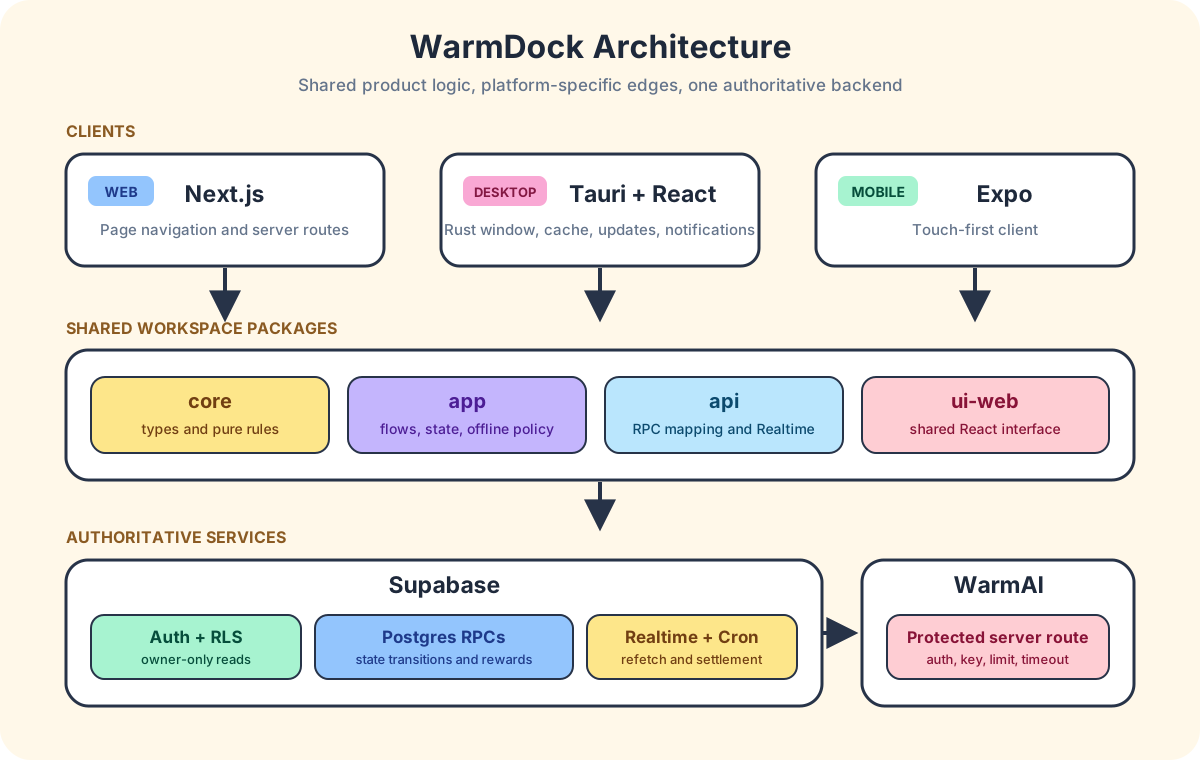
After the refactor, Rust's responsibilities shrank a lot. Task rules and local data used to live in Rust; now it only handles what the desktop actually needs: windows, notifications, encrypted cache, auto-updates, and system permissions. At first it felt like tearing apart something that already worked, but afterward each layer's job was much clearer.
Supabase couldn't just be storage either. Completing a task awards points, might trigger settlement, extend a streak, and affect which features are available. If the browser calculates all that and writes directly to the database, the server isn't making decisions — it's just saving whatever the client claims.
So I only exposed a small set of Postgres functions for mutations. Each function derives the user from the login session, locks the relevant rows, checks the current state, and calculates the result. RLS controls what you can see; functions control what you can change.
When creating a task, the client sends a client_request_id. If the network times out and the same request gets sent again, the database finds the one it already created instead of making another. One action should produce one result, no matter how many times the network retries.
Daily settlement works the same way. The function locks the day's cycle — if settled_at already exists, it stops immediately. No double-counting points or streaks. The cycle also records the timezone from when the day started. I always thought timezone was just a display thing. Turns out it directly determines what "today" is.
Realtime events aren't treated as the final word either. When another device changes a task, the event just says "something changed." The client then re-fetches the latest state from the server. Whether it's a cross-device update, a reconnect, or just reopening the page, everything takes the same path back to truth.
I kept offline support conservative. Without a network, cached content is still readable, but you can't make changes. Supporting offline writes would mean dealing with conflicts: the same task completed on two devices, a day already settled, points already spent on the other side. Without clear merge rules, forcing offline writes would just make it easier to corrupt data.
The AI in WarmDock
WarmDock has an AI feature called WarmAI. It wasn't born out of WarmDock needing AI — I wanted to try building an AI application, and WarmDock happened to be a good testing ground. WarmAI helps score task difficulty, refine descriptions, and provide reference information. For the full story, see WarmAI: My First AI Feature, Built Inside WarmDock.
Cross-Platform Doesn't Mean Preserving the Shape
The desktop dock is literally attached to the edge of the OS. But a regular web page can't float beside every other app — not without becoming a different kind of product. I tried overlays. I tried a browser extension.
It ended up working against the very reason WarmDock exists — adding permissions, setup, and yet another layer to manage, all just to keep the "dock" look. Eventually I removed it and let the web version be a web page.
Mobile forced the interface to change again. Small page controls that felt precise with a mouse were just cramped under a thumb. Navigation gradually moved to dragging the whole card, with larger touch targets. The page-turning rhythm survived; the original shape didn't.
That's when I stopped defining WarmDock by its window. What's actually worth preserving across platforms is the flow — pick a few tasks, confirm, complete, settle the day. A product can change its body as long as the rhythm stays the same.
Correct Data Can Still Be an Invisible Feature
The first weekly review was accurate, but it was buried in a menu. I almost never opened it myself. The backend work was done; the feature failed because it didn't have a good entrance.
I changed it so that when a cycle settles, a small gift box appears on screen. Open it and the review unfolds day by day. The numbers didn't get prettier, but the timing was right.
Then sharing the review hit another snag. "Call the clinic" or a client's name looks perfectly normal in a private todo list. In a public URL, it gets weird. WarmDock lets users choose which completed titles to show, keeps the rest of the summary useful, and makes the link revocable.
I started out asking "can the database produce seven correct days?" I ended up asking "when would someone want to see these?" and "what might they regret showing?" The second set of questions changed the product far more than the first.
Start With What You'll Actually Finish Today
WarmDock isn't the place for every obligation, someday idea, or team project. Pick one thing that matters most today — maybe it's watching a movie, visiting family, or cooking a meal from scratch. Trust me, finishing what you set for yourself each day feels surprisingly good.
Try the live demo, or go straight to the WarmDock web app — it saves each day's content and syncs across devices.
Pick today's important tasks, confirm them, then go get them done.
References
自從我上班之後,除了工作上的事情越來越多,時間變少的同時,自己也會有些想法想去執行,因此我開始嘗試使用待辦清單之類的 APP。雖然一開始的確因為這樣有規劃了一段自己的空閒時間該做什麼事情,但慢慢地越來越懶哈哈,所以待辦事項越疊越多,也漸漸不知道該從何下手。
我開始反省明明好好地列出該做的項目卻進展這麼緩慢,上網看了一圈後確實發現了一種辦法,那就是將大項目拆散成各種節點或是重要細節,因此有了這個 APP — WarmDock。
說白了,待辦工具有時反而會多製造一件事:整理待辦本身。重新排程會讓人感覺輕鬆一點,但別把「整理好了」誤以為是「事情有進展」。我做這個 APP 就是想留一個小地方,放今天真的願意完成的幾件事,訂下來、確認,然後去做。
想感受一下的話,WarmDock Demo 不用登入,也不會保存資料。直接填入一件你今天就可以完成的事進去,馬上就會懂這個工具是幹嘛的。
WarmDock應用程式極簡每日任務小工具Next.jsTauriExpoSupabaseTurborepo打開看看warmdock.guagualab.com一開始我想的是把刪除拿掉
第一版的想法很直接:任務建立之後就不能編輯也不能刪除。聽起來很果斷,實際用了才知道有多煩。打錯字又不是反悔,把「完成報告」改成「寄修改後的報告給 Amy」也只是想得更清楚而已。一個把每次修改都當成言而無信的工具,不叫嚴格,叫找麻煩。
後來才發現真正有用的界線,不是「建立了就不能刪」,而是「還在想」跟「確定要做」之間的那一刀。
WarmDock 現在把任務分成三個階段:剛建立的是 draft,標題可以改,也可以丟掉。選好難度並確認之後變成 ready,接下來就只能變成 completed。一天結算完就不再接受任何修改。
做到這裡才意識到一件事:在 React 裡把編輯按鈕藏起來,不代表任務真的改不了。舊版 client、另一個平台、或者直接呼叫 API 都可能繞過去。所以我把規則搬到後端,update_task_title 和 discard_task 只接受 draft,set_task_detail 負責把 draft 推進到 ready,complete_task 只接受 ready。Postgres 跟畫面講的是同一套規則。
只靠畫面擋住的東西,其實不算產品規則,只是一種視覺上的暗示。
多裝置之後,資料到底聽誰的
其實一開始我只先做了電腦版。但 Web 和 Mobile 加進來之後,事情就完全不一樣了。同一個帳號可能同時開在好幾台裝置上,每台看到的狀態都可能不同。
Browser 完成一項任務的時候 Desktop 剛好斷線,點數算誰的?一台裝置已經過午夜、另一台還停在前一天,「今天」算哪一天?request 送到 server 了但回應 timeout,使用者按 Retry 會不會多建一筆任務?
這些看起來都是小事,但做下去才發現已經在處理分散式系統的問題了。
專案改成用 pnpm 和 Turborepo 管理 monorepo,不過我不是按畫面拆,而是按每一層負責的事來分。apps/web、apps/desktop、apps/mobile 各自處理平台;packages/core 放型別跟規則,packages/app 放流程跟狀態,packages/api 跟 Supabase 溝通,packages/ui-web 讓 Web 和 Desktop 共用 React 介面。
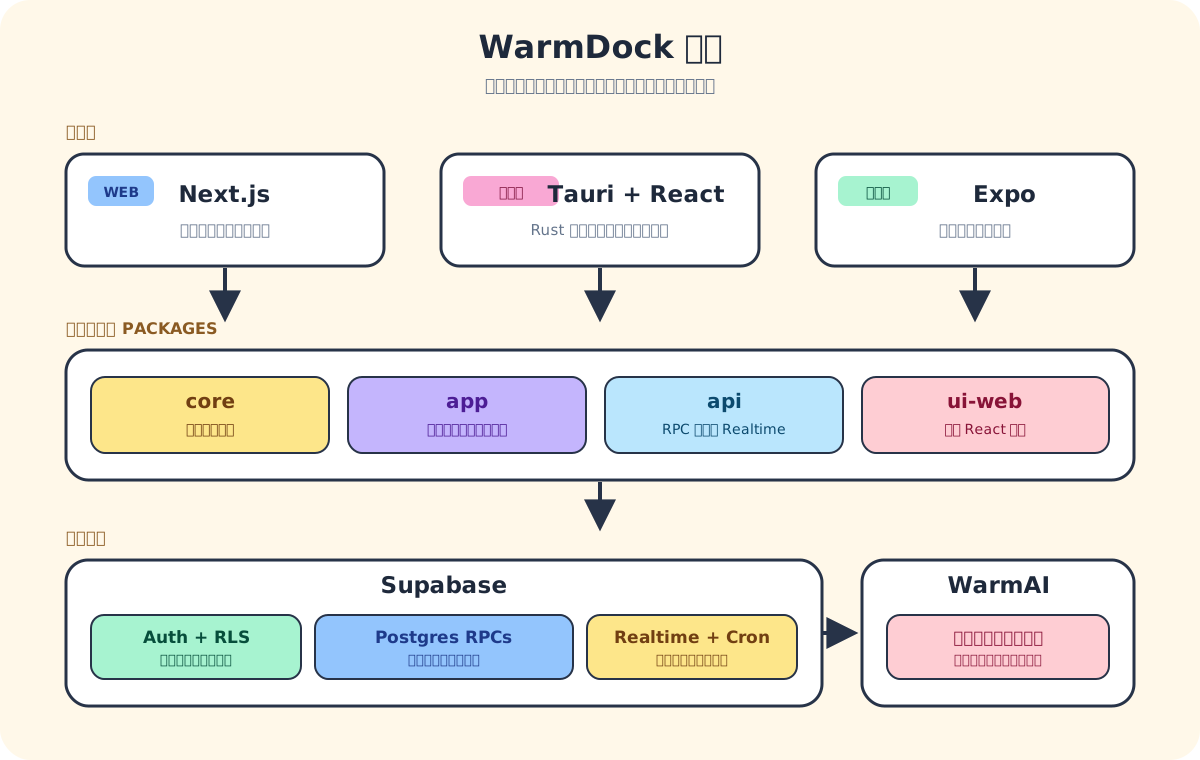
重構之後 Rust 負責的東西少了很多。以前任務規則和本機資料都放在 Rust 裡,後來縮到只做 Desktop 才需要的功能:視窗、通知、加密快取、自動更新跟系統權限。一開始會覺得把做好的東西拆掉很可惜,但後來每一層的責任反而更清楚了。
Supabase 也不能只是拿來存資料。完成任務會加點數,可能觸發結算、延續 streak,還會影響哪些功能可以買。如果讓 Browser 自己算完再直接寫入資料庫,server 根本不是在做決定,只是幫 client 存了一份而已。
所以後來只開放少量 Postgres functions 來做修改。function 會從登入 session 判斷使用者、鎖住相關資料、檢查狀態、算出結果。RLS 限制能看到什麼,function 限制能怎麼改。
建立任務時 client 會帶一個 client_request_id,timeout 重送的話資料庫會找到第一次建的那筆,不會再多一筆。使用者做一次操作就只該產生一次結果,不管網路中間重試了幾次。
每日結算也一樣。function 會鎖住當天的 cycle,如果已經有 settled_at 就直接停止,不會重複加點數或算 streak。cycle 同時也會記下開始時的 timezone。以前我一直覺得時區只是顯示用的,做到這裡才發現它直接決定了「今天是哪一天」。
Realtime event 也不直接當成最終資料。另一台裝置改了任務,event 只是通知「有東西變了」,client 收到後還是會重新跟 server 要最新狀態。不管是跨裝置更新、斷線重連、還是重開頁面,最後都走同一條路同步回來。
離線功能我做得比較保守。沒有網路時快取的內容還是可以看,但不能修改。要支援離線寫入就得處理一堆衝突:同一個任務在兩台裝置都被完成、某天已經結算、點數在另一邊已經花掉了。沒有清楚的合併規則,硬做只會更容易把資料弄亂。
WarmDock 裡的 AI
WarmDock 有整合 AI 功能,稱為 WarmAI。它的出現不是因為 WarmDock 需要 AI,而是我想試做 AI 應用,WarmDock 剛好是個合適的實驗場。WarmAI 會幫任務打難度分數、修正描述、提供參考資訊。詳情請看 WarmAI:用 WarmDock 試做第一個 AI 功能。
跨平台不是保留形狀
Desktop 版的 dock 是真的貼在作業系統邊緣的。但一般網頁做不到懸浮在所有 App 旁邊,除非把它變成另一種產品。我試過 overlay,也試過瀏覽器擴充功能。
結果反而違背了 WarmDock 原本存在的理由——多了權限、設定和另一層要管的東西,只為了保住「dock」的外觀。最後我把它拿掉了,讓 Web 版好好當一個網頁。
Mobile 又逼著介面改了一次。滑鼠用起來很精準的小翻頁按鈕,到了拇指底下就只剩擁擠。導覽慢慢改成拖整張卡片,觸控區域也加大了。翻頁的節奏還在,原本的形狀已經不在了。
到這裡我才停止用視窗來定義 WarmDock。跨平台真正值得保留的是那個流程——選幾件事、確認、完成、結算這一天。產品可以換一副身體,只要節奏還是同一個就好。
資料做對了也可能沒人看
第一版的每週回顧做得很準確,但它藏在選單裡面,我自己都幾乎不會去打開。後端的活早就做完了,功能卻因為沒有一個好的入口而等於不存在。
後來改成:當一個週期結算完畢,畫面上會出現一個小禮物盒。打開之後一天一天展開回顧。數據沒有變好看,但出現的時機對了。
要分享回顧的時候又踩到另一個坑。「打電話給診所」或某個客戶名稱,放在自己的待辦清單裡很正常,放在公開連結裡就很奇怪。WarmDock 讓使用者自己選哪些完成的標題可以顯示,其餘隱藏但摘要還是有用,連結也可以隨時撤銷。
一開始我只在想「資料庫能不能算出正確的七天」,後來反而在想「什麼時候人會想看這些」跟「他們可能後悔讓別人看到什麼」。第二組問題改變產品的幅度比第一組大得多。
先放進今天真的要完成的事
WarmDock 不是存放所有義務、未來想法或團隊專案的地方。選一件今天最重要的事,像是看一場電影、探望家人、自己做一道菜。相信我,完成每天訂下的事項會很有感覺的。
可以先試試 Live Demo;或是直接使用 WarmDock Web App,它會保存每天的內容並在不同裝置之間同步。
選好今天重要的幾件事,確認,然後去完成它。