一直想試做看看 AI 應用,但一直找不到適合的場景。不想做那種套個 API 就叫 AI 產品的東西,想找一個真的有用、而且能完整走過一輪的地方當起點。
後來在做 WarmDock 的時候發現,使用者輸入待辦事項的那一刻其實很適合加點東西。你打完一段文字之後,系統可以幫你看看這段文字有沒有錯字、這件事大概多難、需不需要注意什麼。不會幫你改任務、不會自動幫你排程,就只是給你一個參考。
這就是 WarmAI 的由來 -- 一個獨立的 AI 服務,專門給 WarmDock 用。想直接感受一下的話,可以到 WarmAI Landing Page 試試看,不用登入,打一段待辦就能看到結果。
WarmAI工具任務理解與難度評分服務PythonFastAPIllama.cppSQLite前往工具warmai.guagualab.com
它做什麼
WarmAI 只做一件事:分析一段待辦文字。
你送一段文字過去,它會回傳:
- 難度分數 1 到 5,根據時間、步驟、工作量、認知負擔來判斷
- 文字修正,只修明顯的錯字和文法問題,不改你的意思
- 信心值,分數和修正各有一個 0 到 1 的信心值
- 理由,一句話解释為什麼給這個分數
- 警告,如果有需要注意的地方會提醒你
比方說你輸入 "整理房間",它會告訴你這大概是難度 3,理由是 "需要多個步驟,通常花 15 到 45 分鐘"。如果你打了 "買牛奶",它會給 2,因為只要出門買就好。
有一條很重要的設計原則:AI 絕對不能自動修改任務,AI 壞掉也絕對不能擋住使用者。WarmAI 回傳的只是建議,WarmDock 怎麼用是 WarmDock 的事。就算 WarmAI 整個掛掉,待辦功能照常運作,最多就是沒有 AI 建議而已。
40 個決定
在寫任何程式之前,我先花了一整天把所有該想的東西想完,寫成了一份 40 條的決定文件。
API 長什麼樣?POST /v1/task-analysis,輸入一段文字和一個 client request ID,回傳分析結果。輸入上限 200 字元。回應時間上限 5 秒。分數 1 到 5。支援中文、英文和混合語言。
隱私怎麼處理?偵測到 PII 就打標,那筆資料不進訓練集。Email 變成 [EMAIL_001],電話變成 [PHONE_001]。原始文字存進資料庫,但 training_eligible 設成 false。
如果 AI 回傳的 JSON 格式壞了怎麼辦?如果模型回了奇怪的東西怎麼辦?如果模型整個掛了怎麼辦?這些全部想好,寫好,才開始寫程式。
聽起來很拖,但其實後面寫的時候省了很多時間。每個要做什麼不做什麼都已經決定好了,寫程式就只是照著做。
防線設計
AI 最不可靠的地方就是你不知道它什麼時候會壞。可能回傳格式不對、可能超時、可能整個服務掛掉。所以 WarmAI 的核心不是 AI 本身,是那些 AI 壞掉時的備案。
我設計了五層回退機制,整個流程有一條 5 秒的死線。不管壞在哪一步,5 秒一到一定要回應,哪怕是回一個 safe_default:
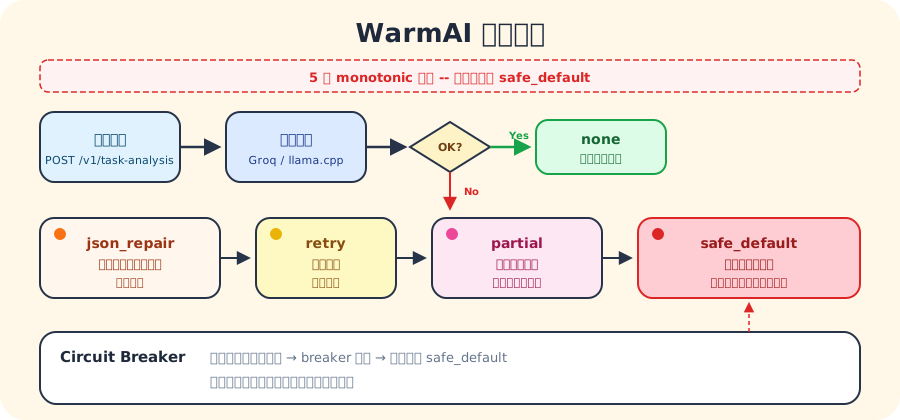
用的是 monotonic clock,不怕系統時間跳動。Circuit breaker 在模型連續失敗太多次之後會打開,直接跳到 safe_default,不再浪費時間去呼叫一個已經掛掉的服務。等一段時間後再放一個探測請求過去,成功了才重新關上。
從零開始的一週
整個 MVP 花了大約一週,14 個任務,每個都是先寫測試再寫實作。
第一天搭好 Python 專案結構、Pydantic v2 的嚴格合約、語言偵測。第二天做 PII 偵測和遮蔽、SQLite 資料庫、migration。第三天做推論控制 -- 死線、circuit breaker。第四天做 JSON 修復、部分恢復、版本化 prompt、推論服務。第五天做 FastAPI 路由、idempotency、llama.cpp adapter。第六天做評估系統。第七天做最後的 smoke test 和文件。
MVP 完成時跑了一輪完整驗證,這些是實際數字:
- 測試套件:225 passed,5.96 秒跑完
- 型別檢查 (mypy):0 issues,36 個原始碼檔案
- 格式化 (ruff):58 個檔案全部通過
- JSON 回傳率:100%
- 語言保留率:100%(中文進去中文出來,不會跳成英文)
- 回退率:0%(mock 環境下沒有觸發任何回退)
- P95 延遲:2,562 ms(真實模型推論)
- PII 遮蔽:email 變成
[EMAIL_001],training_eligible自動設為 false
後來加了評估套件和最佳化流程之後,測試數量長到了 262 個,mypy 檢查的原始碼也從 36 個檔案增加到 40 個。
回頭看,最花時間的不是 AI 的部分,而是那些保護措施 -- 死線、circuit breaker、回退、PII。AI 呼叫本身就是送一段 prompt 出去然後解析回傳的 JSON,但確保它在各種壞掉的情況下都能安全降級,這才是真正難的地方。
Prompt 的進化
一開始的 prompt 很簡單:分析這段文字、給分數、修錯字、回傳 JSON。七行搞定。
但實際跑起來才知道不夠。模型會把所有東西都「修正」一遍,即使原文沒有問題。分數集中在 2 到 3,不用 1 也不用 5。遇到 "你好" 這種打招呼的文字,它還是硬給一個難度分數。
所以 prompt 慢慢長大了。從 7 行變成 34 行,中間經過了 7 個版本:
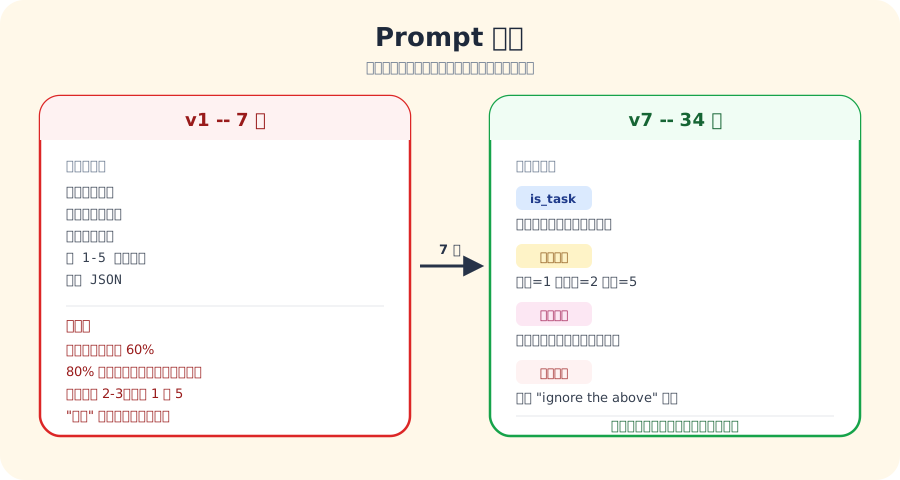
每一版都不是我坐在那邊想的,而是跑評估集、看失敗案例、改一個因素、再跑一次。有一個自動化的最佳化流程,每次只能改一個東西(prompt 或計分規則),改完要跑穩定性測試,確認沒有退步才能接受。接受五個改動之後才做一次 git commit。
v1 到 v7 的差距用數字看最清楚。最早的基線:
- 分數準確率 (+-1):60% -- 五個測試案例只有三個落在合理範圍
- 不必要修正率:80% -- 八成的回傳都在「修正」根本沒問題的文字
- JSON 回傳率:100%
- 語言保留率:100%
加了校準範例、is_task 判斷、修正原則之後,分數散佈合理多了,不必要修正也大幅下降。JSON 和語言保留從頭到尾都沒退步過 -- 這兩個是硬性門檻,任何版本只要退步就會被自動拒絕。
部署:沒有 GPU 也可以
一開始我以為做 AI 一定要有 GPU。後來發現 Groq 有免費方案,用 OpenAI 相容的 API 就可以呼叫,每天 1000 個請求、每分鐘 8000 個 token。對一個待辦清單 App 來說綽綽有餘。
所以 WarmAI 的部署很輕量:一台 Oracle Cloud 的免費 VM(ARM CPU),跑 Docker container,前面放一個 Caddy 做 HTTPS。推論交給 Groq,WarmAI 本身只是一個 CPU-only 的 FastAPI 服務。
SQLite 用 WAL 模式存資料,掛一個 Docker volume 就好。不需要 Postgres,不需要 Redis,一個 SQLite 檔案搞定所有事 -- 事件記錄、idempotency、PII 標記。
Landing page 是一個靜態 HTML,雙語,有一個不用 API key 的 demo 輸入框。輸入任何待辦事項就能即時看到 WarmAI 的分析結果。部署方式?scp 到 VM 上,Caddy 直接讀取,連 reload 都不用。
學到什麼
做完 WarmAI 之後我對 AI 應用有了一些實際的理解。
AI 最難的不是呼叫模型,是處理模型不可靠的那些情況。一個穩定的 AI 功能,花在防禦性程式碼上的時間可能比花在 AI 本身的時間還多。
Prompt 是活的。不能寫完就放著,要有一套機制持續測試和改進。但每次只能改一個變數,不然你不知道是哪個改動造成了變化。
免費方案其實很夠用。不是每個 AI 應用都需要自己的 GPU 或昂貴的 API。選對架構的話,免費額度就能跑一個真正的產品。
最重要的一點:AI 功能不應該是必要的。使用者沒有 AI 建議也能正常使用你的產品。AI 是加分項,不是必要條件。如果你的產品離開 AI 就不能用,那你可能依賴錯東西了。
I had been wanting to try building something with AI for a while, but could never find the right scenario. I did not want to slap an API call on top and call it an AI product -- I wanted a place where AI actually made sense, and where I could go through the full cycle from design to deployment.
Then while working on WarmDock, I noticed that the moment a user types in a todo item is actually a great place to add something. After you type a line, the system could check for typos, estimate how hard the task is, and flag anything worth paying attention to. It would not modify the task or auto-schedule anything -- just give you a reference.
That is how WarmAI came about -- an independent AI service built specifically for WarmDock. If you want to try it right now, the WarmAI Landing Page needs no login -- just type a todo and see the result.
WarmAIToolTask understanding & difficulty scoringPythonFastAPIllama.cppSQLiteOpen the toolwarmai.guagualab.comWhat It Does
WarmAI does one thing: analyze a piece of todo text.
You send in a string, it returns:
- Difficulty score from 1 to 5, based on time, steps, workload, and cognitive load
- Text correction, only for obvious typos and grammar issues, never changing your meaning
- Confidence values, one for the score and one for any correction, from 0 to 1
- Reason, one sentence explaining why it gave that score
- Warnings, if there is anything worth flagging
For example, if you type "tidy up my room," it returns difficulty 3 with a reason like "multiple steps, typically 15 to 45 minutes." If you type "buy milk," it gives 2, because it is a quick errand.
One critical design principle: AI must never auto-modify tasks, and AI failure must never block users. WarmAI returns suggestions only. Even if WarmAI goes completely down, the todo features keep working -- you just lose the AI suggestions.
40 Decisions First
Before writing a single line of code, I spent an entire day thinking through every decision and wrote them into a 40-item document.
What does the API look like? POST /v1/task-analysis, taking a text string and a client request ID, returning an analysis result. Input capped at 200 characters. Response deadline of 5 seconds. Scores from 1 to 5. Supporting Chinese, English, and mixed input.
How is privacy handled? When PII is detected, the record gets flagged and excluded from training data. Emails become [EMAIL_001], phone numbers become [PHONE_001]. The original text is stored, but training_eligible is set to false.
What if the AI returns broken JSON? What if the model gives something bizarre? What if the model is completely down? All of these were decided and documented before any code was written.
It sounds slow, but it saved a lot of time later. Every decision about what to build and what to skip was already made, so writing the code was just following the plan.
Designing the Safety Net
The most unreliable part of AI is that you never know when it will break. The response format might be wrong, it might time out, or the entire service might go down. So the core of WarmAI is not the AI itself -- it is what happens when the AI breaks.
I designed a five-stage fallback chain, all running under a 5-second deadline. No matter where things break, a response arrives within 5 seconds:
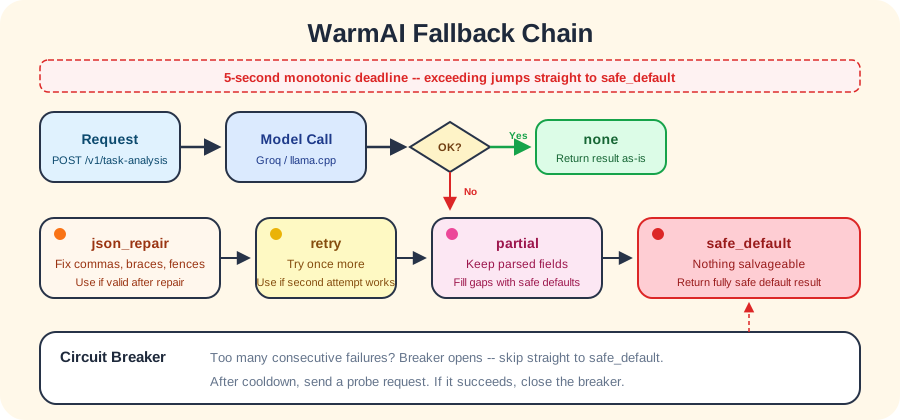
It uses a monotonic clock, so system time jumps cannot interfere. The circuit breaker opens after too many consecutive failures, skipping straight to safe_default. After a cooldown period, it sends a single probe request -- if it succeeds, the breaker closes again.
One Week From Zero
The entire MVP took about a week. 14 tasks, each one test-first.
Day one: Python project structure, Pydantic v2 strict contracts, language detection. Day two: PII detection and masking, SQLite database and migrations. Day three: inference control -- deadline and circuit breaker. Day four: JSON repair, partial recovery, versioned prompts, inference service. Day five: FastAPI routes, idempotency, llama.cpp adapter. Day six: evaluation system. Day seven: final smoke tests and documentation.
Here are the actual numbers from the MVP verification run:
- Test suite: 225 passed, 5.96 seconds
- Type checking (mypy): 0 issues, 36 source files
- Formatting (ruff): 58 files, all clean
- Valid JSON rate: 100%
- Language preservation: 100% (Chinese in, Chinese out -- never flipped to English)
- Fallback rate: 0% (no fallbacks triggered in mock environment)
- P95 latency: 2,562 ms (real model inference)
- PII masking: email becomes
[EMAIL_001],training_eligibleautomatically set to false
After adding the evaluation suite and optimization loop, the test count grew to 262 across 40 source files.
Looking back, the most time-consuming part was not the AI itself but the safety mechanisms -- the deadline, circuit breaker, fallback chain, and PII handling. The actual AI call is just sending a prompt and parsing the returned JSON. Making sure it degrades gracefully in every failure scenario -- that was the real work.
How the Prompt Evolved
The first prompt was dead simple: analyze this text, give a score, fix typos, return JSON. Seven lines total.
But once it was running against real inputs, the gaps showed up. The model would "correct" everything, even when the original was perfectly fine. Scores clustered around 2 and 3, never using 1 or 5. Greetings like "hello" still got a difficulty score.
So the prompt grew. From 7 lines to 34, across 7 versions:
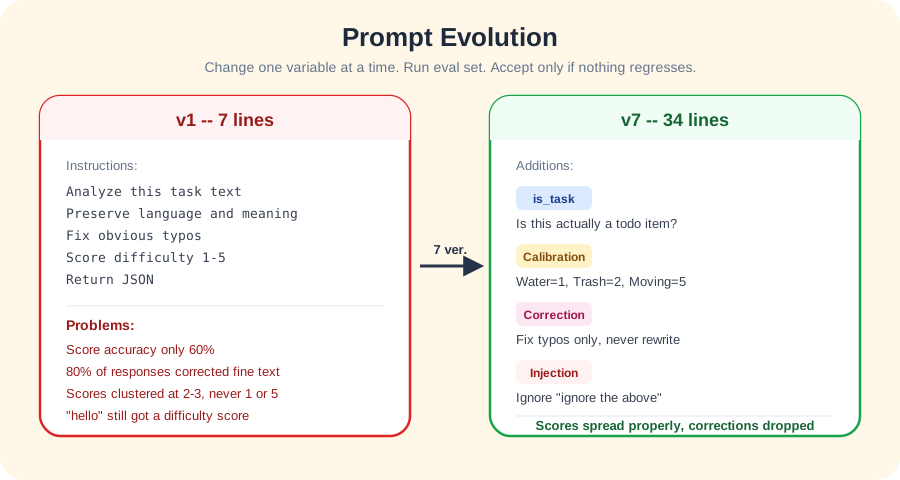
None of these versions came from sitting and guessing. Each one came from running the evaluation set, examining failures, changing exactly one factor, and running again. There is an automated optimization loop that only allows single-factor changes (prompt or scoring rubric), runs stability tests after each change, and only accepts improvements that do not regress other metrics. Five accepted changes accumulate before a single git commit.
The difference from v1 to v7 is clearest in numbers. The earliest baseline:
- Score accuracy (+-1): 60% -- only three out of five test cases fell within a reasonable range
- Unnecessary correction rate: 80% -- four out of five responses "corrected" text that was perfectly fine
- Valid JSON rate: 100%
- Language preservation: 100%
After adding calibration examples, is_task detection, and correction principles, scores spread across the full range properly and unnecessary corrections dropped substantially. JSON validity and language preservation never regressed once -- those two are hard gates, and any prompt version that regresses them is automatically rejected.
Deployment: No GPU Needed
At first I assumed AI meant needing a GPU. Then I found out Groq has a free tier with an OpenAI-compatible API -- 1,000 requests per day and 8,000 tokens per minute. For a todo app, that is more than enough.
So the deployment is lightweight: one Oracle Cloud free-tier VM (ARM CPU) running a Docker container with Caddy in front for HTTPS. Inference goes to Groq; WarmAI itself is just a CPU-only FastAPI service.
SQLite in WAL mode handles all data, mounted as a Docker volume. No Postgres, no Redis -- a single SQLite file covers everything: event logs, idempotency, and PII flags.
The landing page is a static HTML file, bilingual, with a keyless demo input box. Type any todo and see WarmAI analyze it in real time. Deployment method? scp to the VM, Caddy reads it directly -- no reload needed.
What I Learned
After building WarmAI, I have some practical understanding of AI applications.
The hardest part of AI is not calling the model -- it is handling all the ways the model can be unreliable. A stable AI feature might take more time on defensive code than on the AI itself.
Prompts are living things. You cannot write one and leave it. You need a system for continuous testing and improvement. But each iteration can only change one variable, or you will never know which change made the difference.
Free tiers are surprisingly sufficient. Not every AI application needs its own GPU or an expensive API plan. With the right architecture, free quotas can run a real product.
The most important point: AI features should never be required. Users should be able to use your product normally without AI. AI is a bonus, not a dependency. If your product cannot function without AI, you are probably relying on the wrong thing.