背單字這件事,工具從來不缺。Anki、Quizlet、各種 App 都做得很好。但我一直覺得有個地方卡住了:我查到一個字的時候,通常是正在讀一篇文章、看一個網頁;但要記住它,卻得打開另一個 App,手動輸入,脫離了原本的語境。
查單字跟記單字,一直是分開的兩件事。
Kadou 想解決的就是這個:讓你在讀到一個字的當下就能收藏,帶著原句回來複習。不用切換 App,不用手動抄寫。想直接感受一下的話,到 Kadou 不用登入就能開始翻卡片。
Kadou 單字卡應用程式自建牌庫的英文單字卡ReactViteSupabaseBrowser Extension打開看看kadou.guagualab.com
四種語言、四套介面
Kadou 不是只能學英文。它支援四種語言 -- 中文、英文、西班牙文、日文 -- 而且是四套完整的介面,不是翻譯。
設計邏輯是以母語為中心:你的母語是中文,就用中文介面學英文;母語是英文,就用英文介面學中文。每種語言的起始牌組都不一樣 -- 中文版叫「星塵啟程」,英文版叫 Stardust Start,日文版叫「星屑のはじまり」,西班牙文版叫 Polvo de Estrellas。連分享出去的 Open Graph 圖片和 URL 路徑都是各語系獨立的。
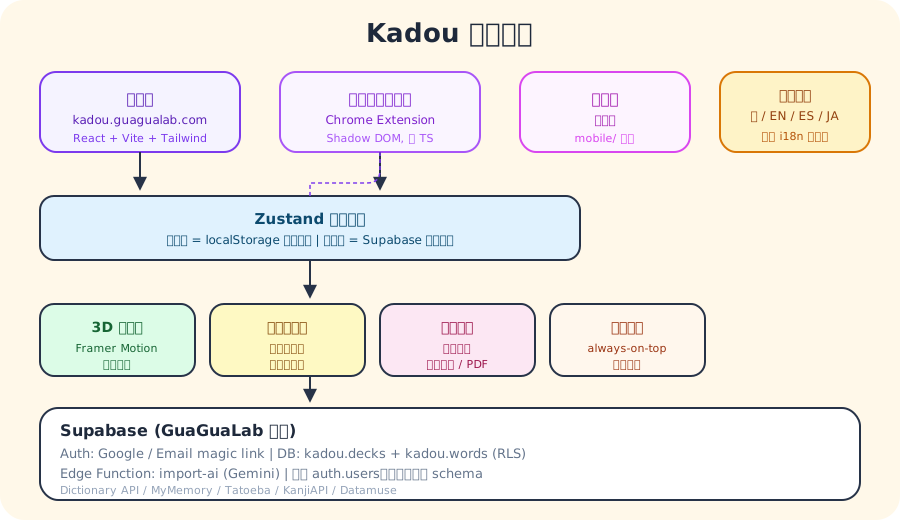
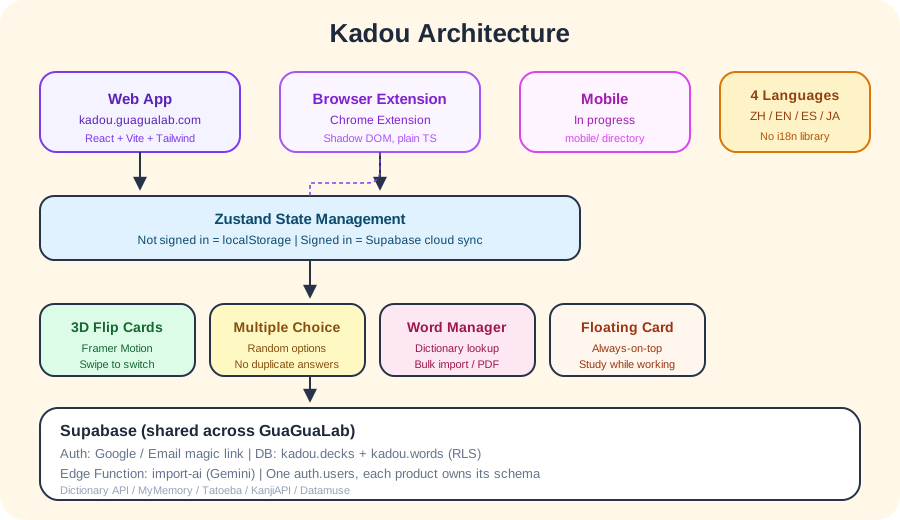
技術上沒用任何 i18n 函式庫。就是一個純物件,中文定義所有的 key,其他三種語言的型別都比對中文版 -- 少了一個 key 就是編譯錯誤,不是執行時的空白。四行 formatter 加 placeholder 替換,不需要複數規則也不需要日期格式化,所以不需要一整個函式庫。
日文特別做了讀音支援。漢字上方會標假名(Ruby text),例句也有。讀音排序會看 JMdict 的優先標籤,把常用的讀法排前面。
它怎麼運作
Kadou 有三個核心功能:單字卡、測驗、單字管理。
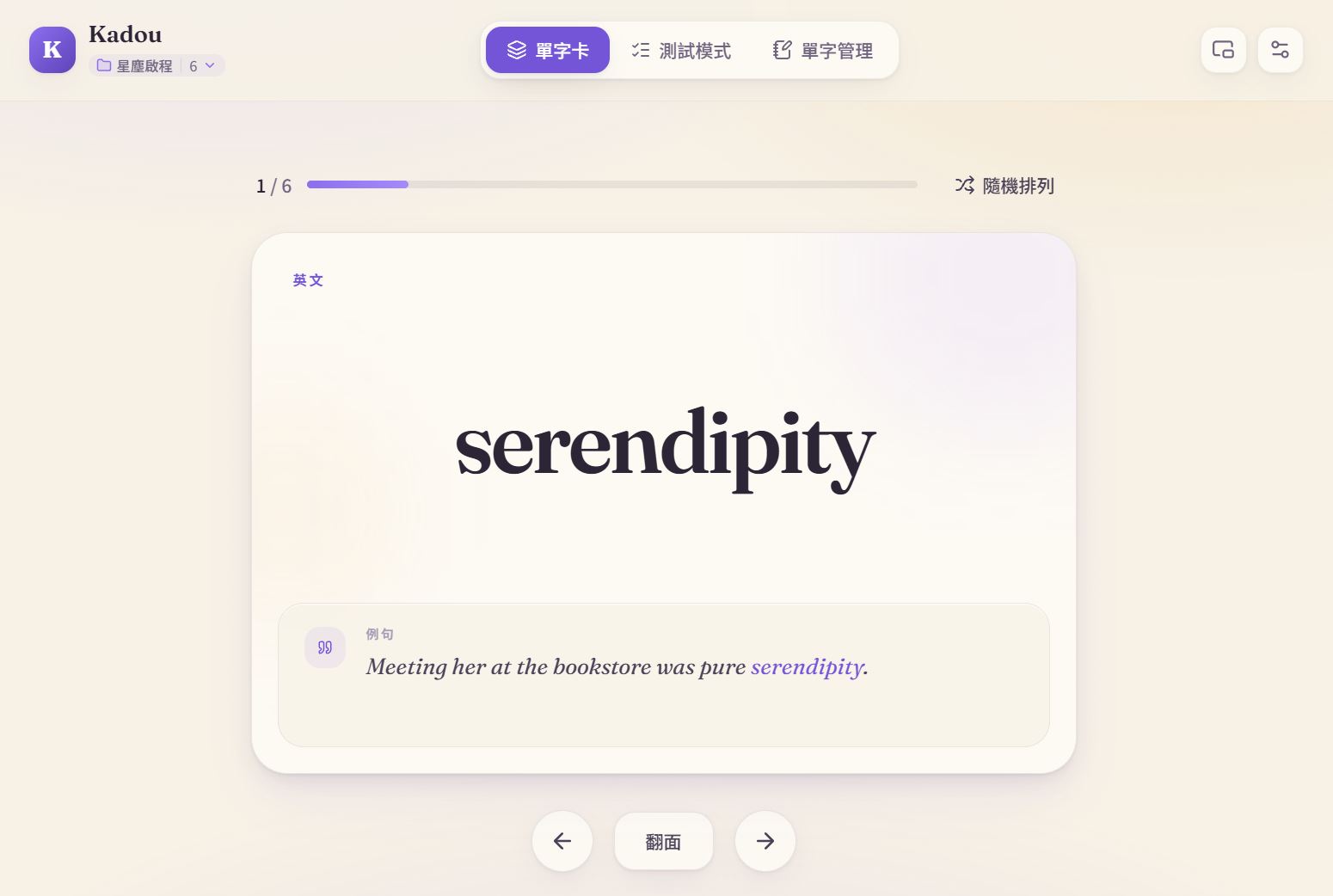
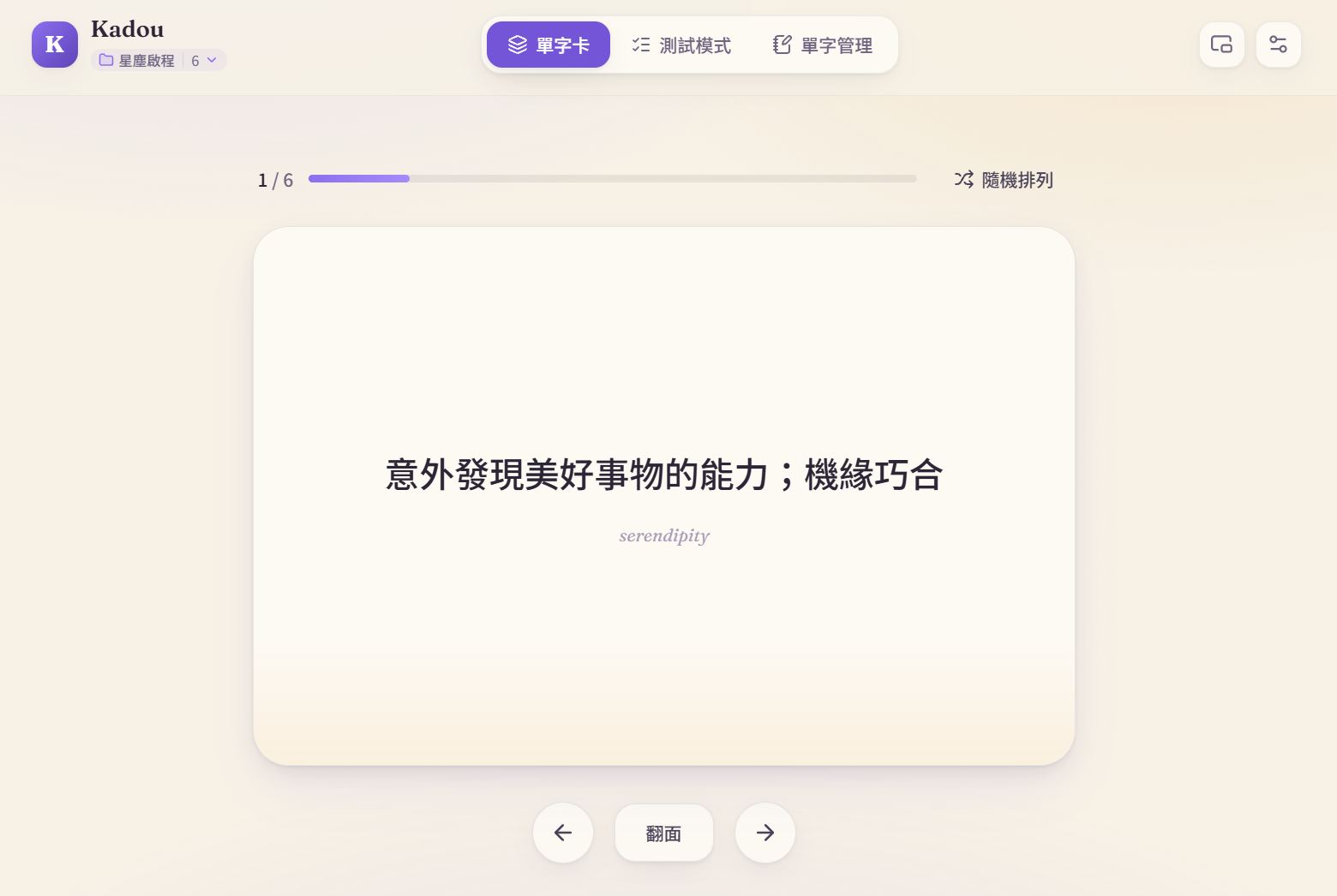
單字卡用 CSS 3D Transform 做翻面,perspective: 1200px 加 backface-visibility: hidden,Framer Motion 處理動畫。手機上可以滑動切換,手指拖到一半放開會自動彈回或切到下一張。鍵盤也能用:空白鍵翻面,左右鍵切換。
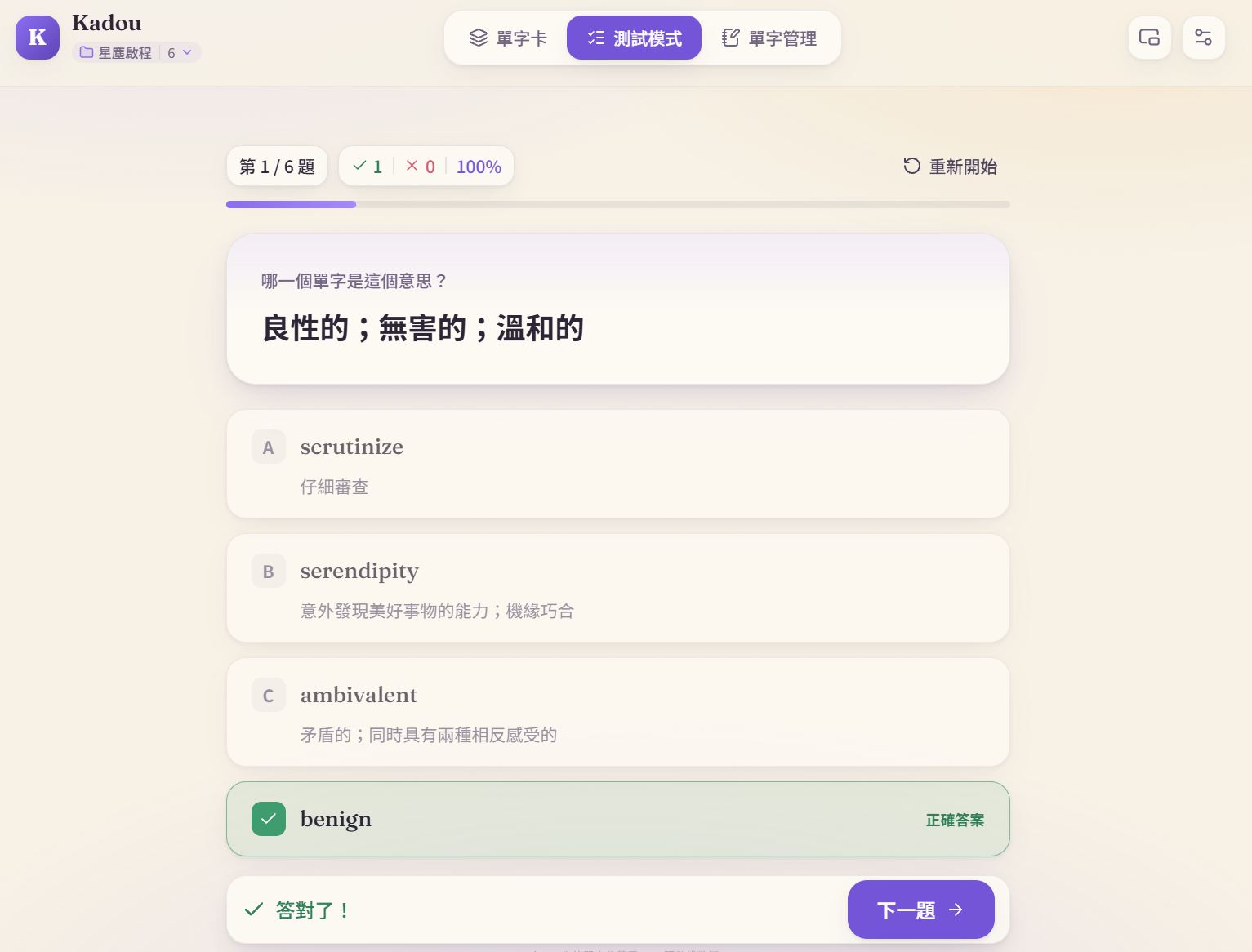
四選一測驗從你的牌庫隨機抽四個選項。有一個 bug 修了很久 -- 以前偶爾會出現兩個正確答案。原因是隨機選項裡剛好選到跟正解同義的字。修掉之後加了去重邏輯,確保四個選項的意思都不同。
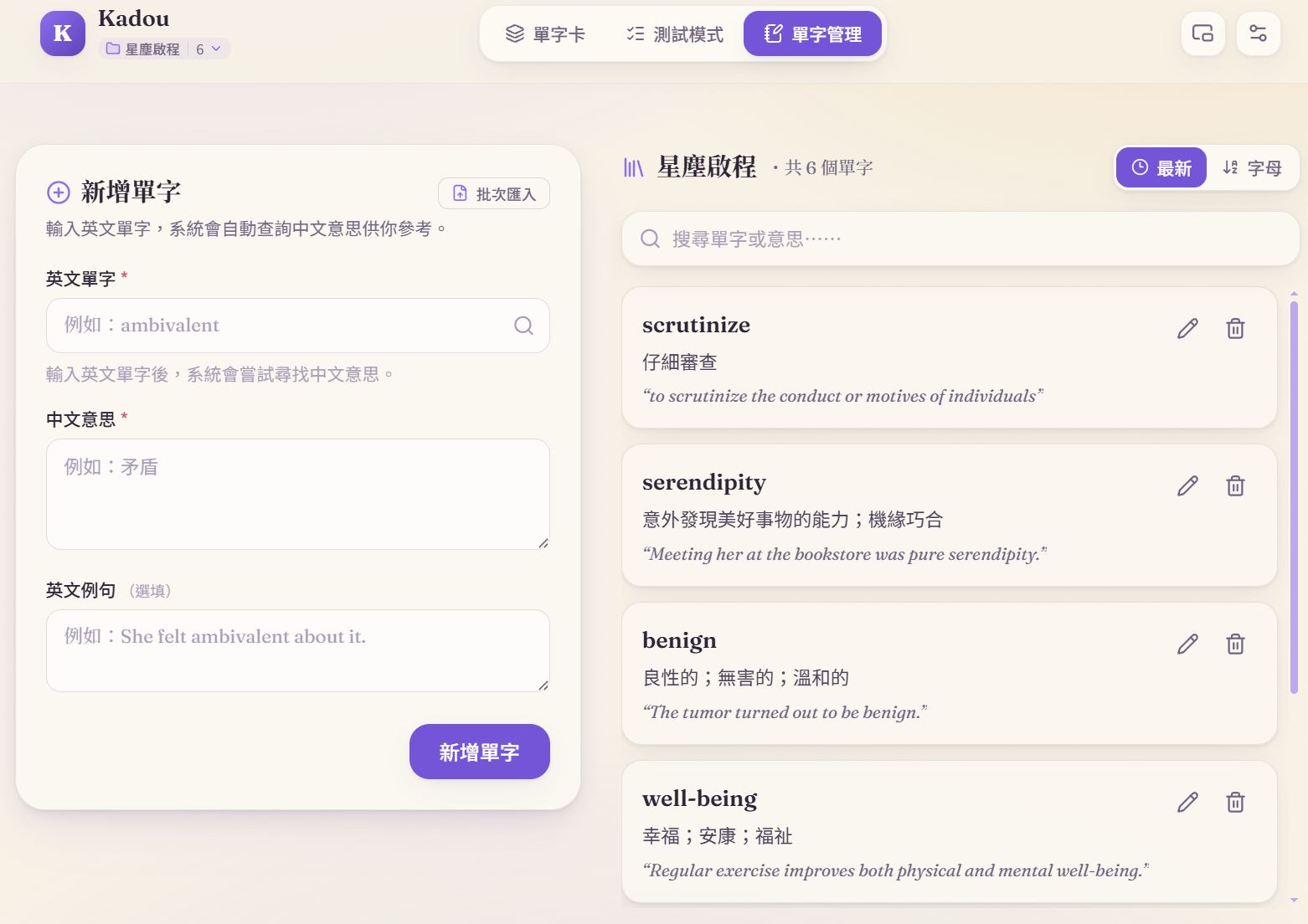
單字管理整合了字典查詢:輸入一個字,自動帶出翻譯、發音、例句。字典服務串了五個 API -- Dictionary API 查存在與音標、MyMemory 翻譯、Tatoeba 找例句、KanjiAPI 查日文讀音、Datamuse 拼字建議。任何一個 API 掛了都不會擋住手動輸入。
還有一個浮動卡片功能 -- 用 Document Picture-in-Picture API 做的 always-on-top 小視窗。打開後每 8 秒自動換一個字,可以邊做別的事邊瞄一眼。
瀏覽器擴充功能
這是 Kadou 真正不一樣的地方。
裝了 Chrome 擴充功能之後,在任何網頁上反白一個字,句尾右下角會出現一顆紫色小點。滑鼠靠過去它會變成 Kadou 的圖示,點下去就打開查詢卡 -- 翻譯、發音、解釋,還有你當下正在讀的那句話。點右上角的加號就能收藏,選一個牌庫或現場建一個新的,原句和來源網址都會一起存下來。
Kadou 單字收藏Chrome 擴充功能反白查字,一鍵收藏到 KadouChrome ExtensionTypeScriptShadow DOM前往工具chromewebstore.google.com
現在可以直接從 Chrome 線上應用程式商店 安裝「Kadou 單字收藏」。裝好後不必改變閱讀習慣,反白、查字、收藏都在原本的網頁上完成。
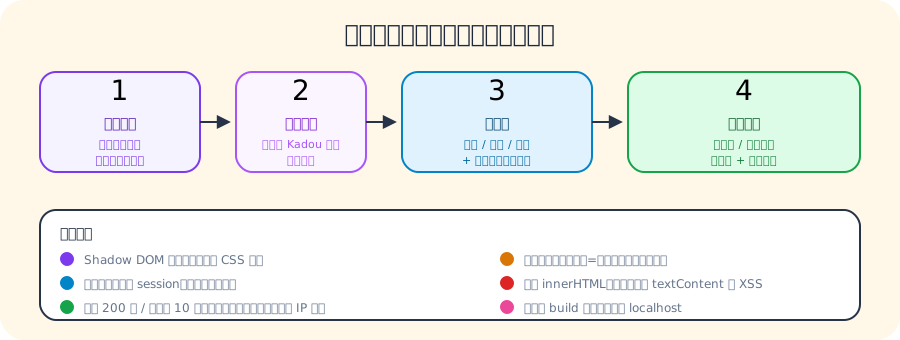
有些小細節花了不少時間。比方說你可能只選到 experience 的 perience,擴充功能會自動補成整個字再查。語言偵測也不是用翻譯 API -- 看字形:假名一定是日文,漢字看網頁的 lang 宣告,拉丁字母先看網頁語言,都判斷不了才用你設定的學習語言當預設。
技術上選擇不用 React -- 因為它要注入到每一個你造訪的網頁裡,網頁的 CSS 和 JS 很容易打架。所以用純 TypeScript + Shadow DOM 隔離,所有文字都用 textContent 設定、不用 innerHTML,從源頭防掉 XSS。
登入也不需要重新來過。擴充功能會在你開著 Kadou 分頁的時候把 session 複製一份到 chrome.storage.local,所以只要在網頁版登入過一次就好。正式版的 build 腳本會自動檢查輸出有沒有包含 localhost -- 有的話直接 build 失敗,不讓開發環境的信任設定洩漏到正式版。
你完全可以先試用
Kadou 在未登入的時候就可以直接使用預設牌組。
打開網站就有一個示範牌庫(就是那個「星塵啟程」)。翻卡片、做測驗都可以,不需要帳號。等你決定登入(Google 或 Email magic link),你可以將自己的牌庫同步到雲端。
狀態管理用 Zustand,搭配 localStorage persist middleware。
有一個很有用的設計叫 pending intent:如果你還沒登入就按了收藏(比方在擴充功能裡),你想做的事會暫存到 localStorage,等 OAuth 導回來之後自動接手完成。
建牌庫不一定要一個一個加
除了字典查詢跟擴充功能收字,Kadou 還可以從檔案匯入。
支援 CSV、TSV、TXT、Markdown -- 這些用規則解析就夠了。比較厲害的是也支援 XLSX 和 DOCX -- 沒有用任何試算表函式庫,自己寫了一個 90 行的 ZIP reader,走瀏覽器原生的 DecompressionStream 解壓 Office 檔案的 XML。PDF 則用 PDF.js 的 web worker 抽文字層。
如果檔案格式太亂(手寫的單字表、掃描的 PDF),可以按 AI 按鈕,呼叫 Supabase Edge Function 轉接 Gemini 來整理或 OCR。掃描 PDF 每次最多 5 頁,文字最多 20,000 字元,每帳號每天 20 次、全站每天 500 次。Gemini 的 API key 只存在 Edge Function,不會送到瀏覽器。訪客可以用規則解析免費試,AI 功能要登入才能用。
開發時間線
回顧 commit 歷史,整個開發過程大概是這樣展開的:
- 原型期:基本翻牌卡 App,加上 onboarding 導覽和 Supabase 帳號系統
- 體驗打磨:互動細節、起始牌庫、浮動卡片(always-on-top 邊工作邊背)
- 多語言:四種語言四套介面,日文讀音支援
- 降低門檻:檔案批量匯入,後來又加大型 PDF 逐頁拆解
- 修 bug:測驗出現兩個正確答案的問題
- 基礎設施:Supabase schema 所有權集中管理,文件化
- 關鍵功能:瀏覽器擴充功能上線
- 正式發布:部署到 kadou.guagualab.com,補分享圖、隱私權政策、多語系 metadata
- 行動端優化:手機滑動切換卡片、資料夾排列、測驗塞進手機畫面
學到什麼
做 Kadou 最大的收獲是理解了漸進式設計的價值。先讓一切在本地運作,登入只是加分 -- 這個選擇讓開發初期可以完全跳過帳號系統,專心把核心體驗做好。等體驗穩定了再接雲端,已經知道哪些狀態需要同步、哪些不需要。
瀏覽器擴充功能教會我的是:注入到別人的頁面裡是一件很敵對的事。網頁的 CSS 會漏進來,JS 會讀你的 DOM,框架會搶 tree 的控制權。Shadow DOM + 純 TypeScript + 不用 innerHTML 這三個決定是一開始就做的,後來證明省了無數跨頁面的相容性問題。
但最讓我興奮的,不是解決了哪個技術問題,而是我真的把一個從零開始的想法,變成了一個可以用的產品。從翻面卡片的動畫到擴充功能注入每一個網頁,從第一張示範牌庫到四種語言的完整介面 -- 每一步都是自己走過來的。這個過程讓我確信:獨立開發者最強大的武器不是技術棧有多深,而是你願不願意把一個東西做完。
讓查過的單字,真的留得下來 -- 這件事,Kadou 做到了。
I had been wanting to build a vocabulary app for a while, but every time I looked at the landscape, the core problem seemed already solved. Anki, Quizlet, and dozens of others do a perfectly fine job of flash cards and spaced repetition.
But there was one thing that always bugged me: when I look up a word, I am usually reading something -- an article, a webpage, a document. To actually remember it, I have to switch to a completely different app, type it in manually, divorced from the context where I found it.
Looking up a word and remembering it have always been two separate steps.
That is exactly what Kadou is about: capturing a word the moment you encounter it, along with the sentence you found it in, so you can review it later in context. No app-switching, no manual copying. Try it yourself -- Kadou works without an account, just start flipping cards.
KadouAppBuild-your-own vocabulary flashcardsReactViteSupabaseBrowser ExtensionOpen the appkadou.guagualab.comFour Languages, Four Interfaces
Kadou is not English-only. It supports four languages -- Chinese, English, Spanish, and Japanese -- with a complete interface for each, not just translated strings.
The design is mother-tongue-centric: if your native language is Chinese, you get a Chinese interface and learn English; if you speak English natively, you get an English interface and learn Chinese. Each language has its own starter deck -- Chinese is "Stardust Start" in Chinese characters, English is "Stardust Start", Japanese is the Japanese equivalent, Spanish is "Polvo de Estrellas". Even the Open Graph images and URL paths are language-specific.
No i18n library. Just a plain object with Chinese defining every key, the other three typed against it -- a missing key is a compile error, not a blank label at runtime. Four lines of formatter code with placeholder substitution. No plural rules, no date formatting, so no library needed.
Japanese gets special treatment with furigana support. Kanji characters show their kana readings above them (Ruby text), including inside example sentences. The readings are sorted by JMdict priority tags so common pronunciations appear first.
How It Works
Kadou has three core features: flashcards, quizzes, and word management.
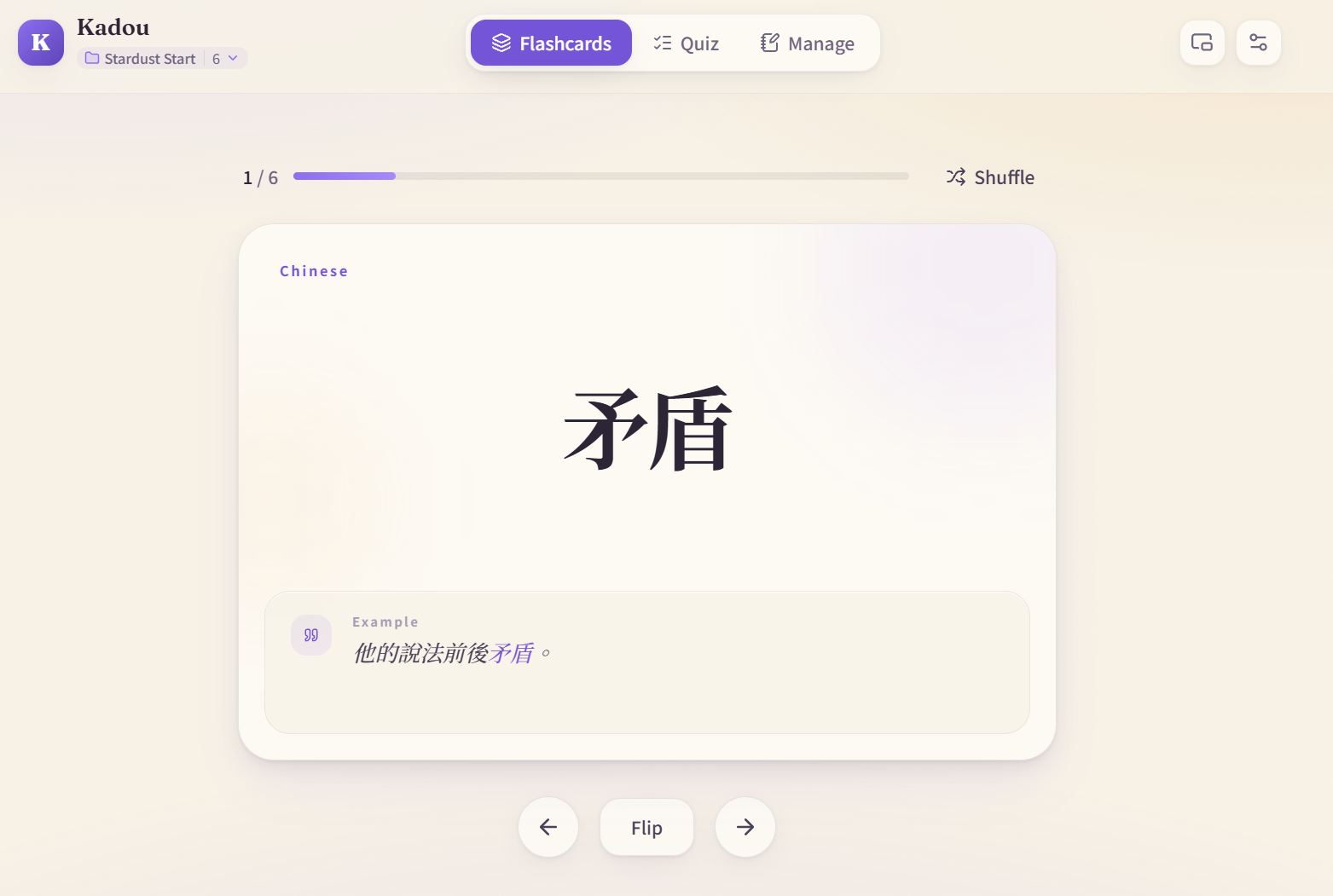
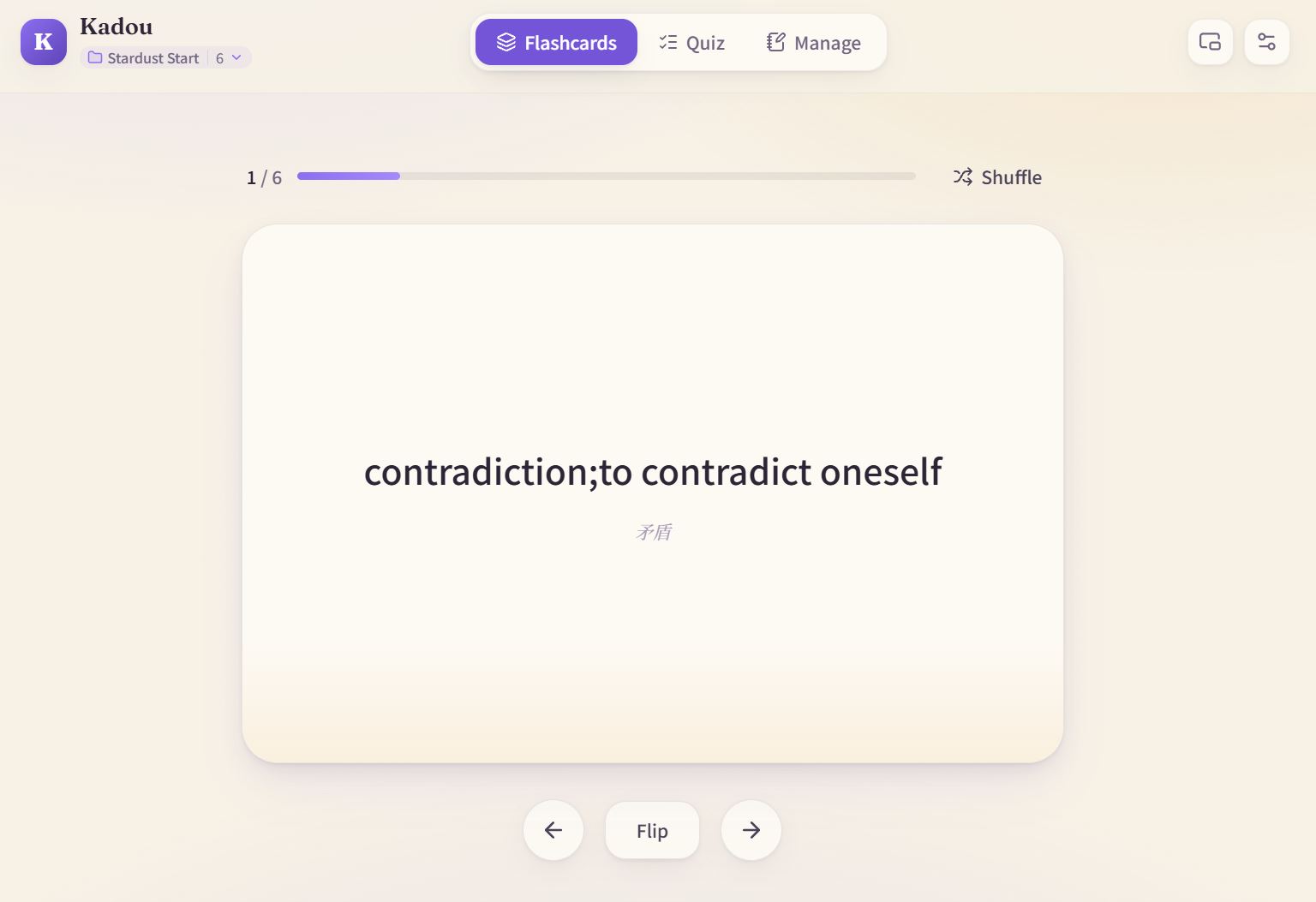
Flashcards use CSS 3D Transforms for the flip -- perspective: 1200px plus backface-visibility: hidden, with Framer Motion handling animations. On mobile you can swipe to switch cards; releasing mid-drag snaps forward or bounces back. Keyboard works too: spacebar flips, arrow keys navigate.
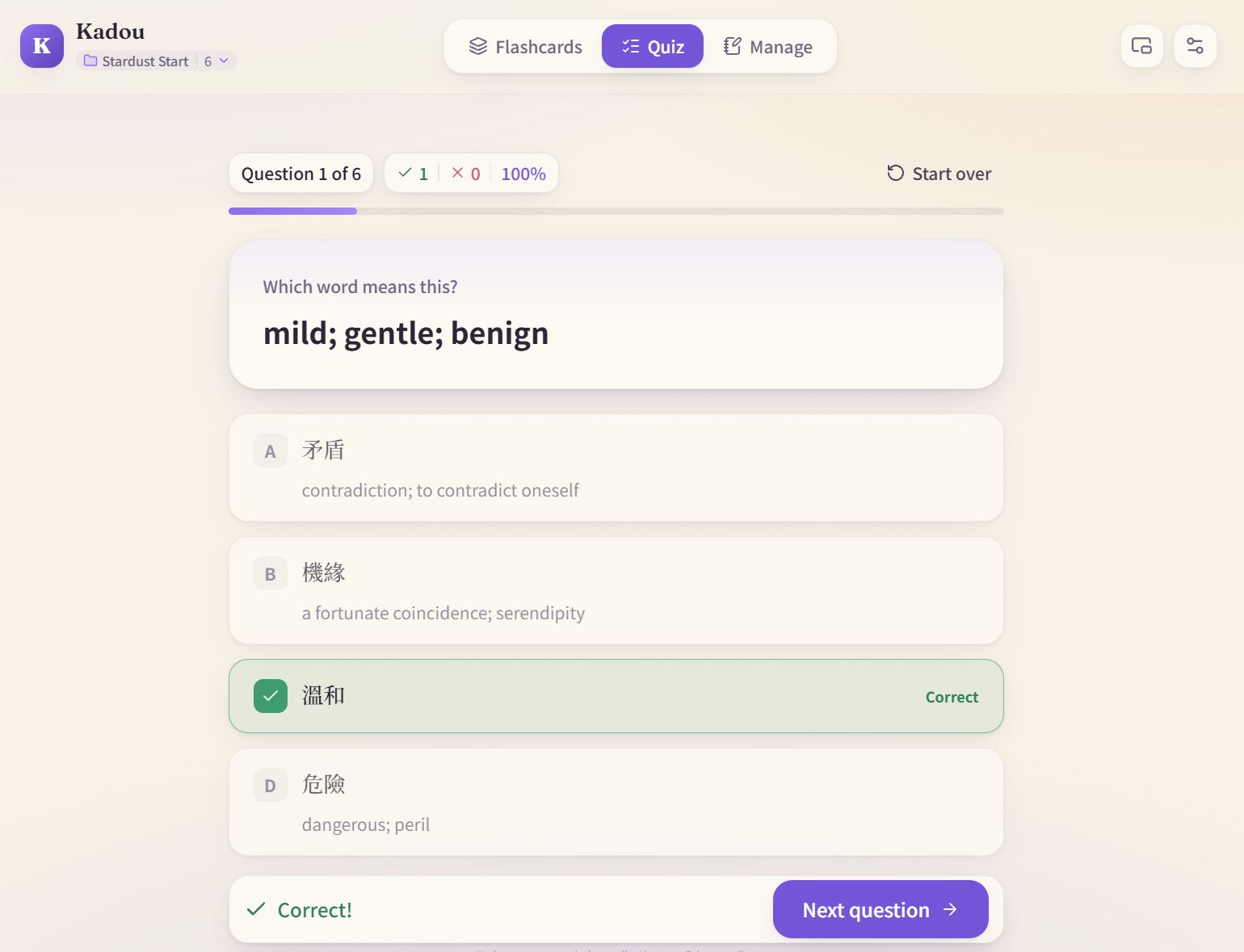
Multiple-choice quizzes draw four options from your deck. There was a bug that took a while to fix -- occasionally two options would both be correct answers. The cause was random selection picking a synonym of the right answer. After fixing it, the quiz includes deduplication logic to ensure all four options have distinct meanings.
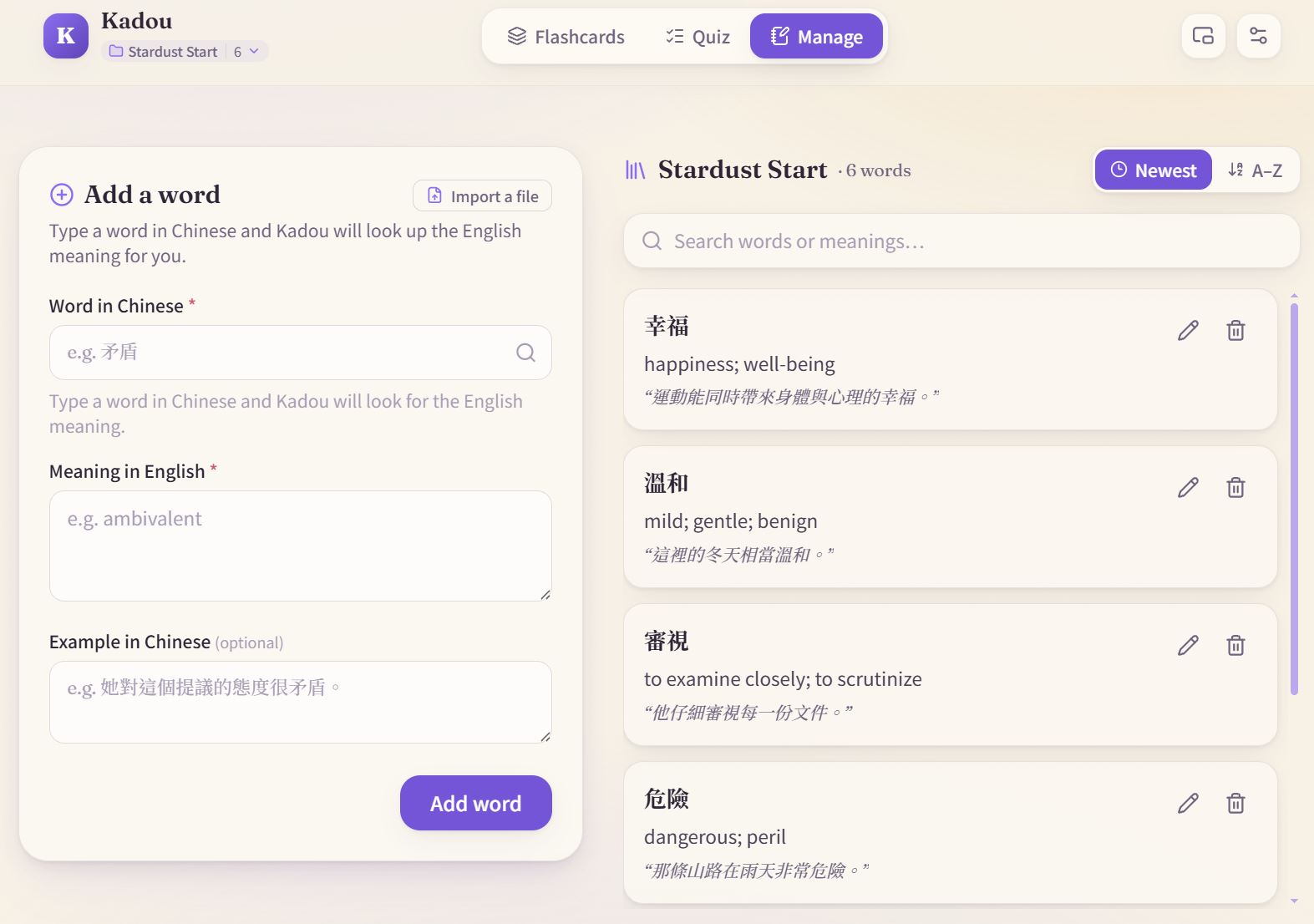
Word management integrates dictionary lookup: type a word and it pulls in translation, pronunciation, and examples. The dictionary service chains five APIs -- Dictionary API for existence and IPA, MyMemory for translation, Tatoeba for example sentences, KanjiAPI for Japanese readings, Datamuse for spelling suggestions. Any single API going down never blocks manual word entry.
There is also a floating card feature -- an always-on-top mini window using the Document Picture-in-Picture API. Once opened it cycles through words every 8 seconds, so you can study while doing something else.
The Browser Extension
This is where Kadou is genuinely different.
With the Chrome extension installed, highlighting a word on any webpage makes a tiny purple dot appear near the end of your selection. Hover over it and it becomes the Kadou icon; click it and a lookup card opens -- translation, pronunciation, explanation, and the sentence you were reading. Hit the plus button to save it: pick a deck or create one on the spot. The original sentence and source URL are saved alongside the word.
You can now install Kadou Browser Extension directly from the Chrome Web Store. Once it is installed, highlighting, looking up, and saving a word all happen on the page you are already reading.
Kadou Browser ExtensionChrome ExtensionCapture words while you browseChrome ExtensionTypeScriptShadow DOMOpen the toolchromewebstore.google.com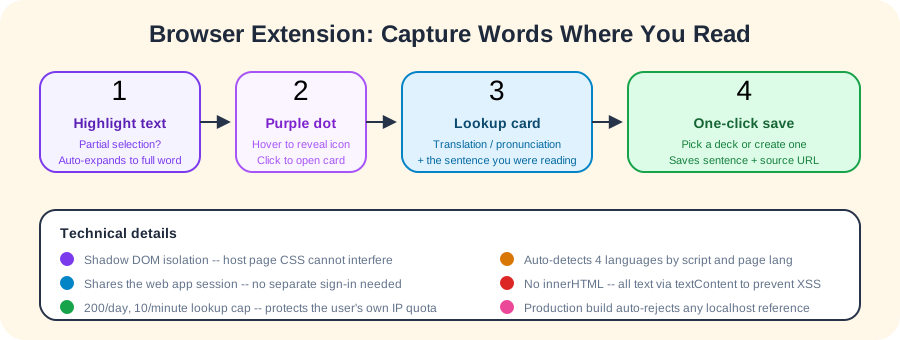
Some details took real effort. If you select only "perience" from "experience", the extension auto-expands to the full word before looking it up. Language detection works by script analysis rather than a translation API -- kana means Japanese, Han characters check the page's lang attribute, Latin letters check the page language first, and fall back to your configured learning language.
The extension deliberately does not use React -- it injects into every page you visit, where the page's CSS and JavaScript can easily conflict. Instead it uses plain TypeScript with a closed Shadow DOM, and all text goes through textContent rather than innerHTML, preventing XSS at the source.
Sign-in is inherited from the web app. The extension copies the session from an open Kadou tab into chrome.storage.local, so you only need to sign in once on the website. The production build script automatically checks that the output contains no localhost references -- if it does, the build fails, preventing dev-environment trust settings from leaking into the release.
You Can Just Try It
Kadou works with the default deck right away, no sign-in required.
Open the site and a demo deck ("Stardust Start") is already there. Flip cards, take quizzes, all without an account. When you decide to sign in (Google or Email magic link), your decks sync to the cloud.
State management uses Zustand with localStorage persist middleware.
One particularly useful pattern: pending intent. If you try to save a word before signing in (say, from the extension), the action is stashed in localStorage. After the OAuth redirect completes, the stashed intent automatically replays.
Building Decks Does Not Have to Be One Word at a Time
Besides dictionary lookup and the extension, Kadou can import from files.
CSV, TSV, TXT, and Markdown work with rule-based parsing. More interesting is XLSX and DOCX support -- no spreadsheet library involved. Instead there is a 90-line custom ZIP reader that walks the central directory and decompresses via the browser's native DecompressionStream, then parses the Office XML inside. PDF uses a PDF.js web worker for the text layer.
For messy files (handwritten vocabulary lists, scanned PDFs), an AI button calls a Supabase Edge Function that proxies to Gemini for cleanup or OCR. Scanned PDFs are limited to 5 pages per request, text to 20,000 characters, 20 calls per user per day, 500 globally. The Gemini API key lives only in the Edge Function -- never reaches the browser. Guests can use rule-based parsing freely; AI features require sign-in.
Development Timeline
Looking back at the commit history, development unfolded roughly like this:
- Prototype: Basic flashcard app, then onboarding tour and Supabase accounts
- Polish: Interaction details, starter decks, floating card (always-on-top study window)
- Go multilingual: Four languages, four interfaces, Japanese readings
- Lower the barrier: Bulk file import, then large PDF page-by-page splitting
- Fix bugs: Quiz occasionally showing two correct answers
- Infrastructure: Centralized Supabase schema ownership, documentation
- Key feature: Browser extension goes live
- Ship it: Deploy to kadou.guagualab.com, add share images, privacy policy, localized metadata
- Mobile optimization: Swipe between cards, folder sorting, fit quiz on small screens
What I Learned
The biggest takeaway from Kadou was understanding the value of progressive design. Making everything work locally first, with sign-in as a bonus rather than a requirement, let me skip the entire account system during early development and focus on getting the core experience right. By the time I wired up the cloud, I already knew exactly which state needed syncing and which did not.
The browser extension taught me that injecting into someone else's page is hostile territory. The page's CSS leaks in, its scripts read your DOM, and its frameworks fight over the tree. Shadow DOM + plain TypeScript + no innerHTML were decisions made on day one, and they saved countless cross-page compatibility headaches later.
But what excites me most is not any particular technical problem I solved -- it is that I actually took an idea from nothing and turned it into a working product. From the card flip animation to injecting the extension into every webpage, from the first demo deck to four complete language interfaces -- every single step was my own. This process convinced me: the most powerful weapon an indie developer has is not how deep your tech stack goes, but whether you are willing to finish what you started.
Capture the words you don't know and make them stay -- that is what Kadou does.